Guide each caller clearly
Use professional greetings and simple routing so callers reach the right administrative team without unnecessary transfers.


Join thousands of businesses that already trust their phone service to LimePhone.
Buy NowCancel anytime
Money back guarantee
Starts at $9/mo


Clear communication for busy practices
Coordinate appointment enquiries, office calls, voicemail, and team handoffs from one professional business phone workspace.
Front desks balance appointments, patient questions, internal handoffs, and periods when nobody can answer immediately.
Route callers to appointments, billing, or the right team
Keep business communication separate from personal devices
Use business hours, greetings, voicemail, and fallback coverage
Designed around real work
LimePhone combines the customer-facing number with the internal ownership your team needs. Calls and supported messages stay professional while responsibility remains visible.
Use professional greetings and simple routing so callers reach the right administrative team without unnecessary transfers.
Let authorized teammates share responsibility for calls, supported messages, voicemail, and follow-up.
Set schedules and fallback handling so the practice communicates clearly when staff are unavailable.
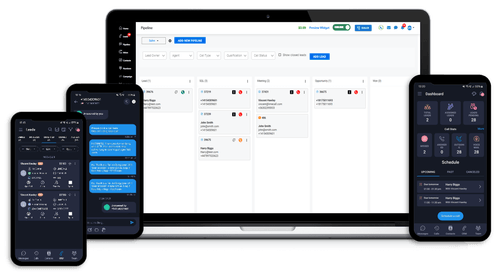
One workspace, less chasing
Customers should not have to know who is working, where they are, or which device they use. Build a communication workflow around the business rather than one employee's phone.
AI receptionist coverage
LimePhone AI can answer approved non-clinical questions, collect appointment requests, schedule supported visits, and transfer callers when the conversation is urgent, sensitive, or outside its defined scope.
Respond from approved information about hours, locations, services, and appointment processes.
Collect contact details and move suitable callers toward connected scheduling availability.
Transfer clinical, urgent, sensitive, or exceptional conversations to a designated human path.
Complete communication coverage
AI is one answering option inside the wider LimePhone business phone system. Numbers, calling, supported messaging, routing, voicemail, and team access keep the full conversation owned by the business.
Direct administrative calls to appointments, billing, or another configured team.
Let authorized staff coordinate calls, supported messages, voicemail, and follow-up.
Set clear opening-hour and after-hours behavior for the practice.
Keep communication context connected to the business account.
Separate practice communication from employees' personal contact details.
Organize supported numbers and call flows around different sites.
From conversation to action
Use LimePhone scheduling and supported integrations for administrative workflows. Each healthcare organization remains responsible for assessing legal, privacy, security, consent, emergency, and recordkeeping requirements.
Connect callers to supported availability for appropriate administrative bookings.
Define clear transfer rules for urgent, clinical, or sensitive conversations.
Limit AI answers to approved business and administrative content.
Built to fit the operation
Start with the communication responsibility the business needs today, then add supported users, numbers, routing, AI coverage, and connected workflows as the operation changes.
Create a clearer path for appointments and everyday administrative calls.
Share responsibility without tying the patient-facing number to one employee.
Organize supported numbers and call flows by practice or site.
Where LimePhone fits
A useful phone system follows the work. Configure numbers, routing, ownership, schedules, and follow-up around the situations that matter to healthcare practices.
Give patients one reliable number for scheduling and administrative questions.
Direct calls by department, team, hours, or supported destination.
Keep messages connected to the business account and visible to authorized staff.
Organize local numbers and communication workflows by location.
More team solutions
Explore adjacent workflows or talk with LimePhone about numbers, users, routing, messaging availability, and migration.
Questions, answered
Product availability can vary by country, number type, carrier, and verification requirements. Talk to the team about your exact setup.
Yes. Call flows can be configured around teams, schedules, availability, and supported destinations.
Authorized users can handle supported business communication from LimePhone experiences without publishing personal numbers.
No. Healthcare organizations should assess their own legal, privacy, security, consent, and recordkeeping requirements before using any communications service.
Eligible numbers can be transferred. Availability and documentation depend on the provider, country, number type, and account status.
It should not. Configure it for approved administrative information, scheduling, capture, and human transfer rather than clinical judgment.
No. The organization must evaluate its own regulatory, privacy, security, consent, emergency, and recordkeeping obligations before deployment.
Start with a professional number and configure LimePhone around the way your team answers, routes, and follows up.
See the workflow
Move between routing, shared conversations, and scheduling to see how the communication system supports the customer journey from first contact to next step.
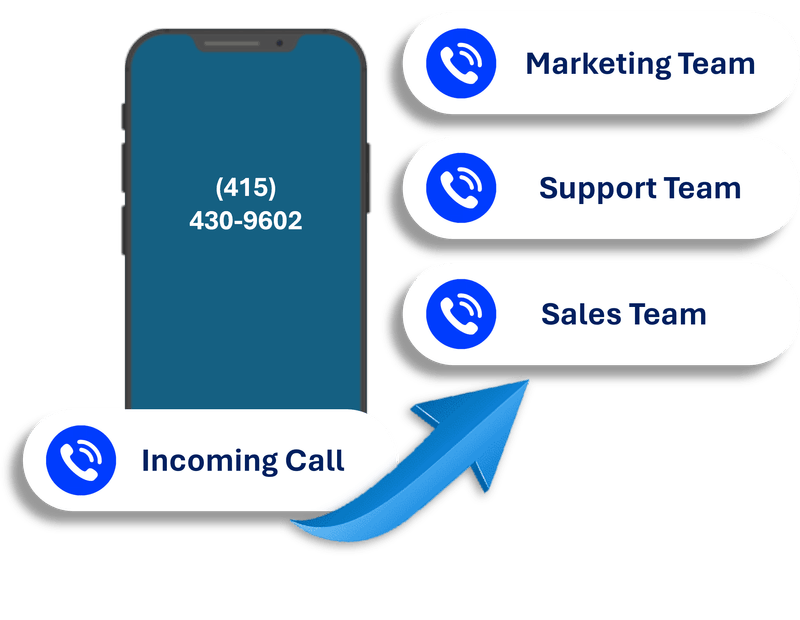
Build answering, working-hour, team, and fallback paths around the customer journey.